How to Pay MEPCO Bill Online: JazzCash, Easypaisa & Banks
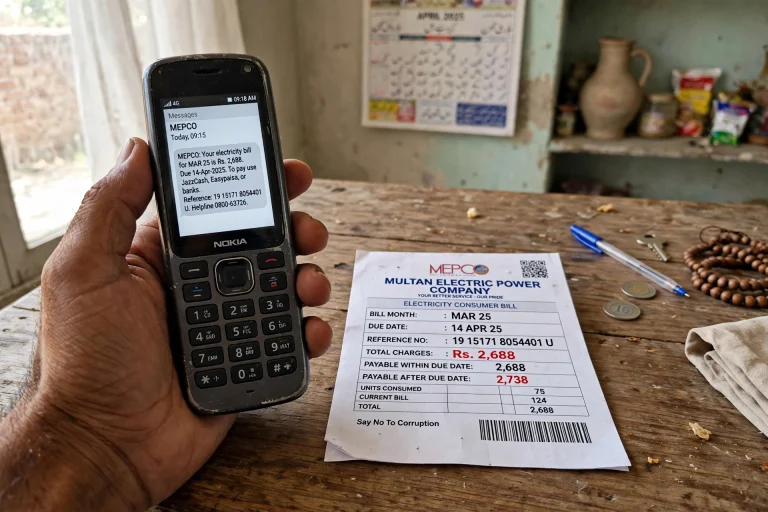
pay mepco bill online and skip the bank line. You only need your 14-digit reference number. JazzCash, Easypaisa and bank apps all fetch your bill. You check the amount. Then you pay. It takes just a few minutes.
Table of Contents
Pay with JazzCash
JazzCash is the fastest way for most people. The whole payment takes a few minutes.
- Open the JazzCash app and log in.
- Tap Bill Payments.
- Select Electricity, then select MEPCO.
- Type your 14-digit reference number.
- The app fetches your bill. Check the amount and the due date.
- Confirm the payment with your MPIN.
- Save the receipt. A screenshot is enough.
JazzCash charges no fee for a bill paid inside the app.
Pay with JazzCash without the app
No smartphone or no internet? You can still pay from a basic phone.
- Dial *786# from your Jazz or Warid SIM.
- Follow the menu to Bill Payments and pick MEPCO.
- Enter your 14-digit reference number.
- Check the amount and confirm with your MPIN.
You only need enough balance in your JazzCash account.
Pay with Easypaisa
Easypaisa works the same way. The app shows the amount before you pay, so match it with your bill first.
- Open the Easypaisa app and log in.
- Tap Bill Payment.
- Select Electricity, then select MEPCO.
- Type your 14-digit reference number.
- Check the amount and the due date.
- Confirm the payment with your PIN.
- Save the receipt or take a screenshot.
Pick MEPCO with care. LESCO and FESCO sit next to it in the list. A payment sent to the wrong company is hard to reverse.
The first 3 bill payments in a month are free on Easypaisa. After that, each bill costs Rs 20. The app shows the fee before you confirm.
Pay with Easypaisa without the app
You can pay from any phone with a Telenor SIM.
- Dial *786#.
- Follow the menu to Bill Payment and pick MEPCO.
- Enter your 14-digit reference number.
- Check the amount and confirm with your PIN.
You can also visit any Easypaisa agent shop. Give the agent your bill or your reference number and pay in cash. The agent may add a small service charge.
Pay with a bank app or ATM
HBL, Meezan, UBL, MCB and Allied Bank apps all list MEPCO under Bill Payments. SadaPay and NayaPay work the same way. Add your reference number once as a saved biller. Then paying takes seconds every month. Your debit card is linked to your bank account, so the amount leaves your account at once.
An ATM works too:
- Insert your card and enter your PIN.
- Select Bill Payments, then Electricity, then MEPCO.
- Type your 14-digit reference number.
- Confirm the amount and take your receipt.
Pay by QR code
New MEPCO bills carry a payment QR code. Open any bank app or wallet and scan it. The app fills your reference number and amount on its own. Check both with care, then confirm. It is the fastest method when it works.
Charges and fees
Paying your MEPCO bill online is free or nearly free. JazzCash charges no fee for a bill paid inside the app. Easypaisa keeps the first 3 bill payments of the month free, then charges Rs 20 per bill. Bank apps are free for most accounts. An agent shop may add a small service charge for a cash payment. Always read the confirmation screen before you pay. It shows the exact fee, if any. Fees can change, so the confirmation screen is the final word.
Before you pay
Check the bill first
Check it first with our bill checker. You will see the exact amount and due date.
Pay before the due date
Pay after the due date and a 10% late surcharge is added to your next bill. Pay at least 2 to 3 hours before midnight on the due date. Online payments can take a few hours to show in the MEPCO system. Do not wait for the last day.
Keep your receipt
Keep it safe until the payment shows as cleared.
Debited but no receipt?
Do not pay again in a hurry. First check the payment history in your app. Note the transaction ID. Then wait a few hours. Most stuck payments clear on their own, or the amount returns to your account. If nothing moves in one working day, contact your bank or wallet helpline with the transaction ID.
Common questions
Is there any fee to pay a MEPCO bill online?
JazzCash charges no fee inside the app. Easypaisa keeps the first 3 bill payments of the month free. Bank apps are free for most accounts. The confirmation screen always shows the fee before you pay.
How long does the payment take to clear?
Most payments show in the MEPCO system within a few hours. Some take up to 1 working day. Keep your receipt until the payment shows as cleared.
Can I pay after the due date?
Yes. The app shows the after due date amount with the 10% late surcharge added. Pay that amount.
Can I pay without the app?
Yes. Dial *786# on JazzCash or Easypaisa and follow the menu. Or visit any agent shop with your bill or your reference number.
My amount looks wrong. What should I do?
First check your MEPCO bill and match the amount with your paper bill. If the amount still looks wrong, do not pay yet. Visit your nearest MEPCO office or call the helpline.
First time here? Start with our mepco bill check guide.
Or read how to find your reference number before paying.